Dublo
Dublo
In a previous post I showed how I built a data platform in one week with Snowflake as the source of truth. A fair follow-up question: what if you want the benefits of a warehouse (SQL, tables, a catalog) without paying for warehouse compute that sits idle most of the day?
That is what a lakehouse gives you. This guide walks through a working lakehouse I built on AWS with Delta Lake, AWS Glue, the Glue Data Catalog and Athena, with the real code, and what I would change if I built it again in late 2026. It's written for data engineers who want a hands-on build, and for data leads deciding whether a lakehouse fits their team.
What is a lakehouse architecture on AWS?#
A lakehouse stores your data as files in object storage (S3) but adds a table layer on top, so you get warehouse features: ACID transactions, schema enforcement, updates and deletes, time travel. Delta Lake and Apache Iceberg are the two main open table formats that provide that layer.
On AWS, the pieces map like this:
- Storage: S3 buckets holding Parquet data files plus the Delta transaction log (
_delta_log/). - Compute: AWS Glue (serverless Spark) for transformations.
- Catalog: AWS Glue Data Catalog, which holds table names, schemas and S3 locations.
- Query: Amazon Athena for SQL, plus any BI tool that connects to Athena.
- Orchestration: Apache Airflow (self-hosted or Amazon MWAA). You pay for storage and for compute only while jobs or queries run. That is the main reason teams pick a lakehouse over an always-available warehouse.
Lakehouse vs data warehouse: when does each make sense?#
| Lakehouse (S3 + Delta/Iceberg + Glue + Athena) | Cloud warehouse (Snowflake, BigQuery) | |
|---|---|---|
| Storage | Open files in your own S3 buckets | Managed, proprietary storage |
| Compute billing | Glue per DPU-hour, Athena per TB scanned | Per credit or per TB scanned / slot |
| Engine lock-in | Low: Spark, Athena, Trino, DuckDB, Databricks read the same files | Higher: data lives in the vendor |
| Ops effort | Higher: you own file layout, compaction, permissions | Lower: most of it is handled for you |
| Best for | Large or spiky volumes, Spark-heavy teams, AWS-native stacks | SQL-first teams, many concurrent BI users, small data teams |
My honest take: for most SMBs with a few hundred GB, a warehouse is simpler. The lakehouse wins when volumes grow, when you already run Spark, or when you want to own your data in open formats on your own cloud account.
Architecture overview#
Here is the full flow of the proof of concept:
I provisioned everything with Terraform:
- An ECR repository for the Lambda Docker image.
- IAM roles for Lambda and Glue.
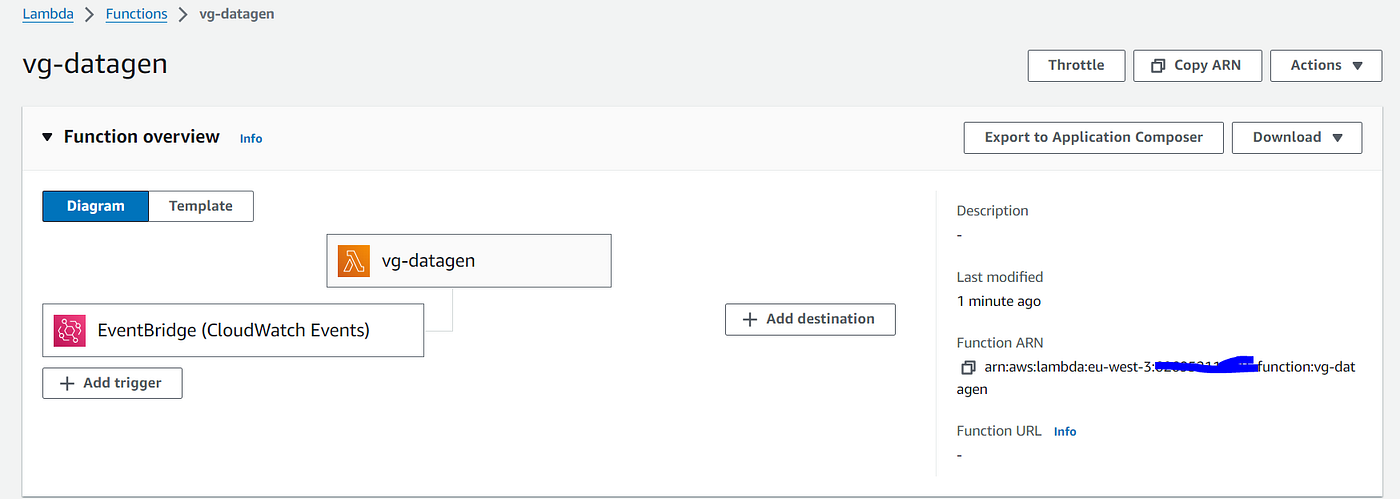
- An EventBridge rule that triggers the Lambda function every two hours.
- Three S3 buckets: raw data from Lambda, Glue scripts, and the lakehouse itself.
- Three Glue Data Catalog databases (bronze, silver, gold), each pointing to its own prefix in the lakehouse bucket.
- An EC2 instance running Airflow in Docker (MWAA is the managed alternative).
Terraform for the Glue databases and jobs#
The catalog databases are the backbone. Each one maps to an S3 prefix, so every table written into bronze ends up under s3://vg-lakehouse/lakehouse/bronze/.
resource "aws_glue_catalog_database" "bronze" {
  name         = "bronze"
  location_uri = "s3://vg-lakehouse/lakehouse/bronze/"
}

resource "aws_glue_catalog_database" "silver" {
  name         = "silver"
  location_uri = "s3://vg-lakehouse/lakehouse/silver/"
}

resource "aws_glue_catalog_database" "gold" {
  name         = "gold"
  location_uri = "s3://vg-lakehouse/lakehouse/gold/"
}
In the original version, Airflow created the Glue jobs on the fly through create_job_kwargs, and I uploaded the Delta JARs (delta-core_2.12-2.1.0) to S3 myself. Today I would define the jobs in Terraform and let Glue 5.0 load Delta natively:
resource "aws_glue_job" "bronze" {
  name              = "bronze-layer-job"
  role_arn          = aws_iam_role.glue.arn
  glue_version      = "5.0"
  worker_type       = "G.1X"
  number_of_workers = 2
  timeout           = 30

  command {
    name            = "glueetl"
    script_location = "s3://vg-lakehouse-glue/bronze_glue_script.py"
    python_version  = "3"
  }

  default_arguments = {
    "--datalake-formats"        = "delta"
    "--enable-glue-datacatalog" = "true"
    "--conf"                    = "spark.sql.extensions=io.delta.sql.DeltaSparkSessionExtension --conf spark.sql.catalog.spark_catalog=org.apache.spark.sql.delta.catalog.DeltaCatalog"
  }
}
Repeat for silver and gold. Two G.1X workers were plenty for this dataset.
One more fix from the original repo: I attached AmazonS3FullAccess to the Glue and Lambda roles. Scope those policies to the three buckets instead, and attach AWSGlueServiceRole with an aws_iam_role_policy_attachment resource (the inline managed_policy_arns argument is deprecated in recent AWS provider versions).
Data source: generating test data with Lambda#
I didn't want to spend hours looking for the right dataset, so I wrote a Python script with Faker that generates video game data. Every run creates two JSON files: 10 games and 10,000 player sessions.
| Table | Key fields |
|---|---|
| Game_Info | GameID, Genre, Publisher, Rating (E, T, M), Game_Length, ReleaseDate |
| Player_Activity | PlayerID, GameID, SessionID, StartTime, EndTime, ActivityType, Level, ExperiencePoints, AchievementsUnlocked, CurrencyEarned, CurrencySpent, QuestsCompleted, EnemiesDefeated, Deaths, PlayMode, and more |
The script runs on AWS Lambda as a container image. GitHub Actions builds the image, pushes it to ECR and creates or updates the function. An EventBridge rule (rate(2 hours)) triggers it.
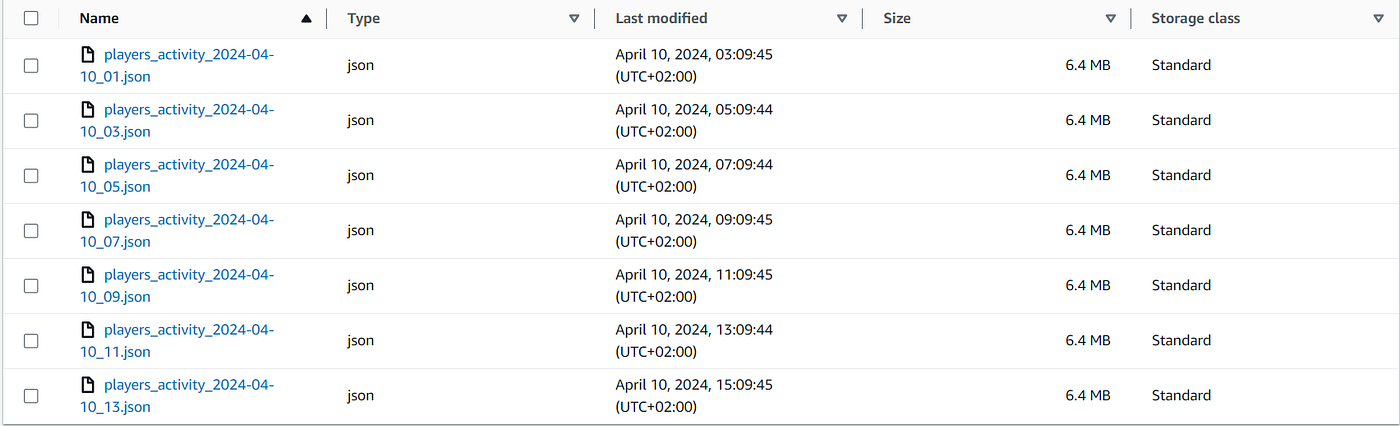
Files land in the raw bucket, partitioned by day:
games_key = f"Games/{datetime.now().strftime('%Y-%m-%d')}/games_info_{datetime.now().strftime('%Y-%m-%d_%H')}.json"
players_key = f"Players/{datetime.now().strftime('%Y-%m-%d')}/players_activity_{datetime.now().strftime('%Y-%m-%d_%H')}.json"
How do you build bronze, silver and gold layers with AWS Glue and Delta Lake?#
Each layer is a Glue database and a Glue PySpark job. Each job reads from the previous layer and writes Delta tables to the next.
Setting up a Glue job for Delta Lake#
With --datalake-formats delta and the --conf job parameter shown above, the Spark session that Glue gives you already has Delta configured. The shared boilerplate looks like this:
import sys
import logging

from awsglue.context import GlueContext
from awsglue.job import Job
from awsglue.utils import getResolvedOptions
from pyspark.context import SparkContext
from pyspark.sql import DataFrame
from pyspark.sql import functions as F

args = getResolvedOptions(sys.argv, ["JOB_NAME"])
sc = SparkContext()
glue_context = GlueContext(sc)
spark = glue_context.spark_session

job = Job(glue_context)
job.init(args["JOB_NAME"], args)

logging.basicConfig(level=logging.INFO, format="%(asctime)s - %(levelname)s - %(message)s")
logger = logging.getLogger(__name__)


def write_delta_table(df: DataFrame, database: str, table: str) -> None:
    """Write a Delta table to S3 and register it in the Glue Data Catalog."""
    df.write.format("delta").mode("overwrite").saveAsTable(f"{database}.{table}")
    logger.info("Table %s.%s written", database, table)
saveAsTable is the important part. Because the job runs with --enable-glue-datacatalog, Spark uses the Glue Data Catalog as its metastore, so the table is created (or updated) in the right database and stored under that database's S3 location.
Bronze: raw data as Delta tables#
The bronze job reads the raw JSON and writes it as-is in Delta format. The files are JSON arrays with indentation, hence the multiline option.
def read_raw_json(path: str) -> DataFrame:
    return spark.read.option("multiline", "true").json(path)


def main() -> None:
    games_df = read_raw_json("s3://vg-raw-data/Games/*/*.json")
    players_df = read_raw_json("s3://vg-raw-data/Players/*/*.json")

    write_delta_table(games_df, "bronze", "games_info")
    write_delta_table(players_df, "bronze", "players_activity")


if __name__ == "__main__":
    main()
    job.commit()
Silver: cleaning and typing#
Silver reads from bronze and applies the cleaning rules: deduplicate games, map rating codes to labels, bucket player levels, cast timestamps and compute session duration in minutes.
def read_delta(database: str, table: str) -> DataFrame:
    return spark.read.format("delta").load(f"s3://vg-lakehouse/lakehouse/{database}/{table}")


def clean_games(games_df: DataFrame) -> DataFrame:
    return games_df.dropDuplicates(["GameID"]).withColumn(
        "Rating",
        F.when(F.col("Rating") == "E", "Everyone")
        .when(F.col("Rating") == "T", "Teen")
        .when(F.col("Rating") == "M", "Mature")
        .otherwise("NoRating"),
    )


def clean_activities(activities_df: DataFrame) -> DataFrame:
    return (
        activities_df
        .withColumn(
            "Level",
            F.when(F.col("Level") < 30, "Beginner")
            .when(F.col("Level") < 60, "Mid-Level")
            .when(F.col("Level") >= 60, "Advanced")
            .otherwise("Unknown"),
        )
        .withColumn("StartTime", F.col("StartTime").cast("timestamp"))
        .withColumn("EndTime", F.col("EndTime").cast("timestamp"))
        .withColumn(
            "SessionDuration",
            (F.col("EndTime").cast("long") - F.col("StartTime").cast("long")) / 60,
        )
    )
Small correction from the original code: I used strict > and < comparisons for the level buckets, so players at exactly level 30 or 60 fell into "Unknown". The chained when above fixes that.
Gold: business metrics#
Gold is where the joins and aggregations happen. This layer feeds reports and dashboards. I built three tables: session metrics, game genre metrics and player level metrics. Here is the genre one:
def game_genre_metrics(activities_df: DataFrame, games_df: DataFrame) -> DataFrame:
    return (
        activities_df.join(games_df, on="GameID", how="inner")
        .groupBy("Genre")
        .agg(
            F.round(F.mean("SessionDuration")).alias("avg_session_duration_minutes"),
            F.sum("QuestsCompleted").alias("total_quests_completed"),
            F.round(F.mean("Game_Length")).alias("avg_game_length_hours"),
        )
    )


def main() -> None:
    games_df = read_delta("silver", "games_info")
    activities_df = read_delta("silver", "players_activity")

    write_delta_table(game_genre_metrics(activities_df, games_df), "gold", "games_genre_metrics")
    # session_metrics and player_level_metrics follow the same pattern
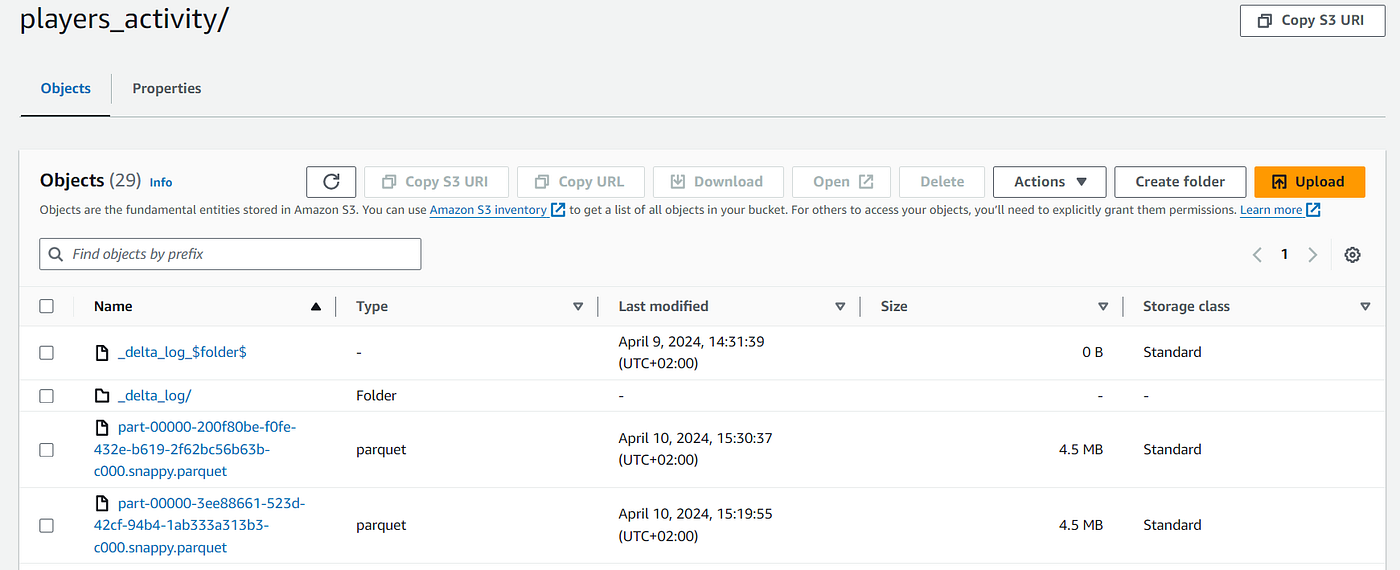
On S3, each Delta table is a folder of Parquet files plus a _delta_log/ folder holding the transaction log.
Going incremental with MERGE#
The POC rewrites every table on each run (mode("overwrite")). That's fine for a demo but it reprocesses all history every night. In production I would pass the run date to the bronze job, read only that day's raw folder, and upsert into silver with a Delta MERGE:
from delta.tables import DeltaTable

target = DeltaTable.forName(spark, "silver.players_activity")

(
    target.alias("t")
    .merge(new_sessions_df.alias("s"), "t.SessionID = s.SessionID")
    .whenMatchedUpdateAll()
    .whenNotMatchedInsertAll()
    .execute()
)
This is the main reason to use a table format instead of plain Parquet: you get safe upserts and deletes on S3.
How do you query Delta Lake tables with Athena?#
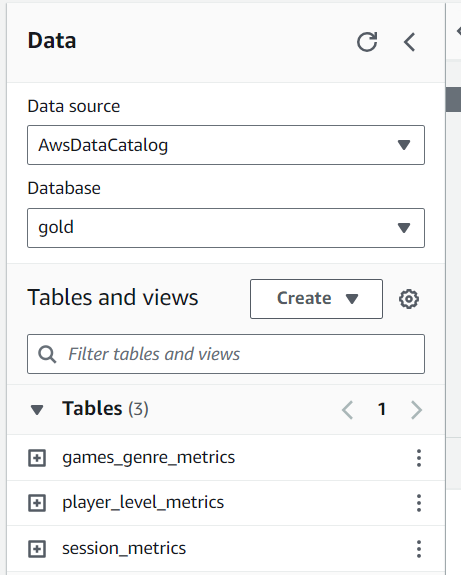
This is the part I like most. Every time a job creates or updates a Delta table with saveAsTable, the table appears in the Glue Data Catalog under the right database. No Glue crawler needed.
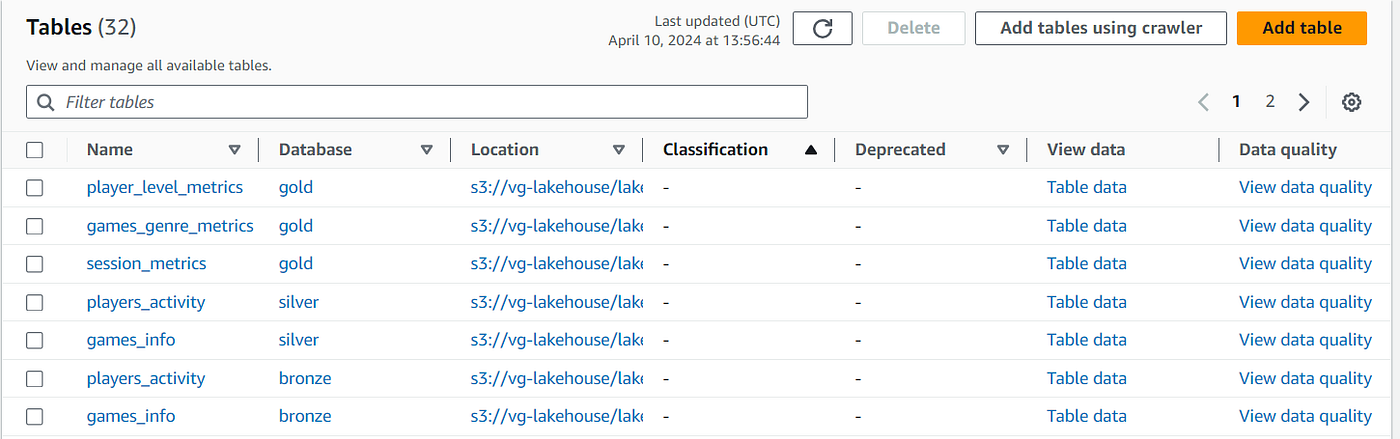
Athena reads Delta Lake tables natively, so you can explore any layer with SQL straight away:
SELECT genre,
       avg_session_duration_minutes,
       total_quests_completed
FROM gold.games_genre_metrics
ORDER BY avg_session_duration_minutes DESC;
If a table was not created by Spark (or Athena doesn't pick up the columns), you can register it directly:
CREATE EXTERNAL TABLE gold.player_level_metrics
LOCATION 's3://vg-lakehouse/lakehouse/gold/player_level_metrics/'
TBLPROPERTIES ('table_type' = 'DELTA');
From there, any BI tool with an Athena connector (QuickSight, Tableau, Power BI, Metabase) can sit on the gold layer. That's where the business value shows up: dashboards built on a clean, tested model instead of raw exports.
Bonus for local development: DuckDB's delta extension can read the same tables from your laptop, which is handy for quick checks without spinning up Spark.
INSTALL delta; LOAD delta;
CREATE SECRET (TYPE s3, PROVIDER credential_chain);
SELECT * FROM delta_scan('s3://vg-lakehouse/lakehouse/gold/games_genre_metrics') LIMIT 10;
Orchestrating the Glue jobs with Airflow#
Airflow schedules the three jobs every day at 20:00, in order: bronze, then silver, then gold. The Amazon provider's GlueJobOperator does the heavy lifting. Here is the DAG updated for Airflow 3 (on Airflow 2.x, import dag from airflow.decorators and use the same code):
from datetime import datetime, timedelta

from airflow.providers.amazon.aws.operators.glue import GlueJobOperator
from airflow.sdk import dag


@dag(
    schedule="0 20 * * *",
    start_date=datetime(2026, 1, 1),
    catchup=False,
    tags=["lakehouse", "glue"],
    default_args={
        "retries": 2,
        "retry_delay": timedelta(minutes=5),
        "aws_conn_id": "aws_default",
    },
)
def vg_lakehouse():
    bronze = GlueJobOperator(task_id="bronze_layer", job_name="bronze-layer-job", deferrable=True)
    silver = GlueJobOperator(task_id="silver_layer", job_name="silver-layer-job", deferrable=True)
    gold = GlueJobOperator(task_id="gold_layer", job_name="gold-layer-job", deferrable=True)

    bronze >> silver >> gold


vg_lakehouse()
deferrable=True hands the wait to the triggerer, so a worker slot isn't blocked while a Glue job runs for 10 minutes.

In the original version, the DAG also uploaded the Glue scripts to S3 on every run. I'd move that to CI/CD (next section). I go deeper on this pattern, including failure alerts, in how to orchestrate AWS Glue jobs with Airflow.
Honest note: for exactly three sequential jobs, Glue Workflows or Step Functions would also work. Airflow pays off once you add more sources, dbt runs, or cross-system dependencies.
CI/CD and monitoring#
For monitoring, everything runs on AWS, so CloudWatch collects Glue and Lambda logs and metrics. Add a CloudWatch alarm or an Airflow on_failure_callback that posts to Slack, so failures don't go unnoticed until someone opens a dashboard.
For CI/CD, GitHub Actions deploys the code. The original workflows used long-lived AWS access keys stored as secrets. Use OIDC instead: GitHub gets short-lived credentials by assuming an IAM role.
name: deploy-pipeline

on:
  push:
    branches: [main]
    paths: ["pipeline/**"]

permissions:
  id-token: write
  contents: read

jobs:
  deploy:
    runs-on: ubuntu-latest
    steps:
      - uses: actions/checkout@v4

      - uses: aws-actions/configure-aws-credentials@v4
        with:
          role-to-assume: arn:aws:iam::${{ secrets.AWS_ACCOUNT_ID }}:role/github-deploy
          aws-region: eu-west-3

      - name: Upload Glue scripts
        run: aws s3 sync pipeline/glue/ s3://vg-lakehouse-glue/

      - name: Upload DAGs to MWAA
        run: aws s3 sync pipeline/dags/ s3://my-mwaa-bucket/dags/
If you self-host Airflow on EC2 like I did, don't open ports 22 and 8080 to 0.0.0.0/0. Use SSM Session Manager or restrict the security group to your IP.
Delta Lake or Apache Iceberg on AWS?#
When I built this, Delta Lake was the obvious choice for Spark users. In 2026, AWS has invested heavily in Iceberg (Athena write support, S3 Tables, automatic compaction in the Glue Data Catalog). Both work, but the trade-offs are real.
| Delta Lake | Apache Iceberg | |
|---|---|---|
| Write from Glue Spark | Yes, native | Yes, native |
| Write from Athena SQL (INSERT, MERGE) | No, read only | Yes |
| Managed table maintenance on AWS | Manual (OPTIMIZE, VACUUM from Spark) | Glue Data Catalog optimization, S3 Tables |
| Best fit | Teams also using Databricks | AWS-native teams, SQL-first teams (dbt on Athena) |
If I started this project today on AWS only, I would probably pick Iceberg so analysts could run dbt models directly on Athena. If your team works in Databricks, Delta remains the natural choice, and this whole pipeline ports there with minor changes.
Production checklist#
- Glue jobs defined in Terraform with
glue_version = "5.0"and--datalake-formats - IAM policies scoped to specific buckets, no
S3FullAccess - Incremental loads with
MERGEinstead of full overwrites - Regular
OPTIMIZEandVACUUMon Delta tables to keep file counts low - Table and column descriptions in the Glue Data Catalog
- Failure alerts to Slack or email
- OIDC for GitHub Actions, no stored AWS keys The descriptions point matters more than it used to. A documented gold layer is what makes your data usable by AI agents and text-to-SQL tools, not just by analysts. That's the base of every AI project we take on.
FAQ#
What is the difference between a data lake and a lakehouse?#
A data lake is files in object storage with no transactional guarantees, so updates, deletes and concurrent writes are risky. A lakehouse adds an open table format (Delta Lake or Iceberg) on top, which brings ACID transactions, schema enforcement and time travel. You keep cheap S3 storage and get most of the reliability of a warehouse.
Can Amazon Athena query Delta Lake tables?#
Yes. Athena reads Delta Lake tables natively when they are registered in the Glue Data Catalog, either by Spark's saveAsTable or with a CREATE EXTERNAL TABLE statement using TBLPROPERTIES ('table_type' = 'DELTA'). Athena cannot write to Delta tables, though. For writes from SQL, you need Iceberg.
Do I need Databricks to use Delta Lake?#
No. Delta Lake is open source and runs on any Spark environment, including AWS Glue and Amazon EMR. Glue 5.0 includes Delta Lake support out of the box, enabled with the --datalake-formats delta job parameter. Databricks adds managed features on top, but it isn't required.
Is a lakehouse cheaper than Snowflake?#
It depends on your workload. A lakehouse bills Glue and Athena only when jobs and queries run, which suits batch pipelines and spiky usage. If you have many analysts querying all day, a warehouse can be simpler and similarly priced, and it needs less engineering time, which is often the bigger cost.
Which AWS Glue version should I use for Delta Lake?#
Use Glue 5.0 for new jobs. It runs Spark 3.5 with Python 3.11 and loads Delta Lake natively, so you don't manage JAR files. Glue 4.0 also supports native Delta, but with an older Delta release.
Key takeaways#
- A lakehouse on AWS is S3 + an open table format + Glue Data Catalog + Athena. No always-on compute.
- The medallion layout (bronze, silver, gold) maps cleanly to Glue databases and S3 prefixes.
saveAsTablewith the Glue catalog enabled removes the need for crawlers.- Modernize the 2024 version: Glue 5.0 native Delta, Terraform-defined jobs, incremental
MERGE, OIDC in CI/CD, Airflow 3. - Consider Iceberg if you are AWS-only and want SQL writes from Athena. The full original code is on GitHub: vg-metrics-lakehouse.
Want a lakehouse or warehouse set up for your team, without spending months on infrastructure? We design and build data foundations on AWS, GCP and Snowflake that your team owns end to end. Book a call with Dublo and we'll map out the right architecture for your data.